

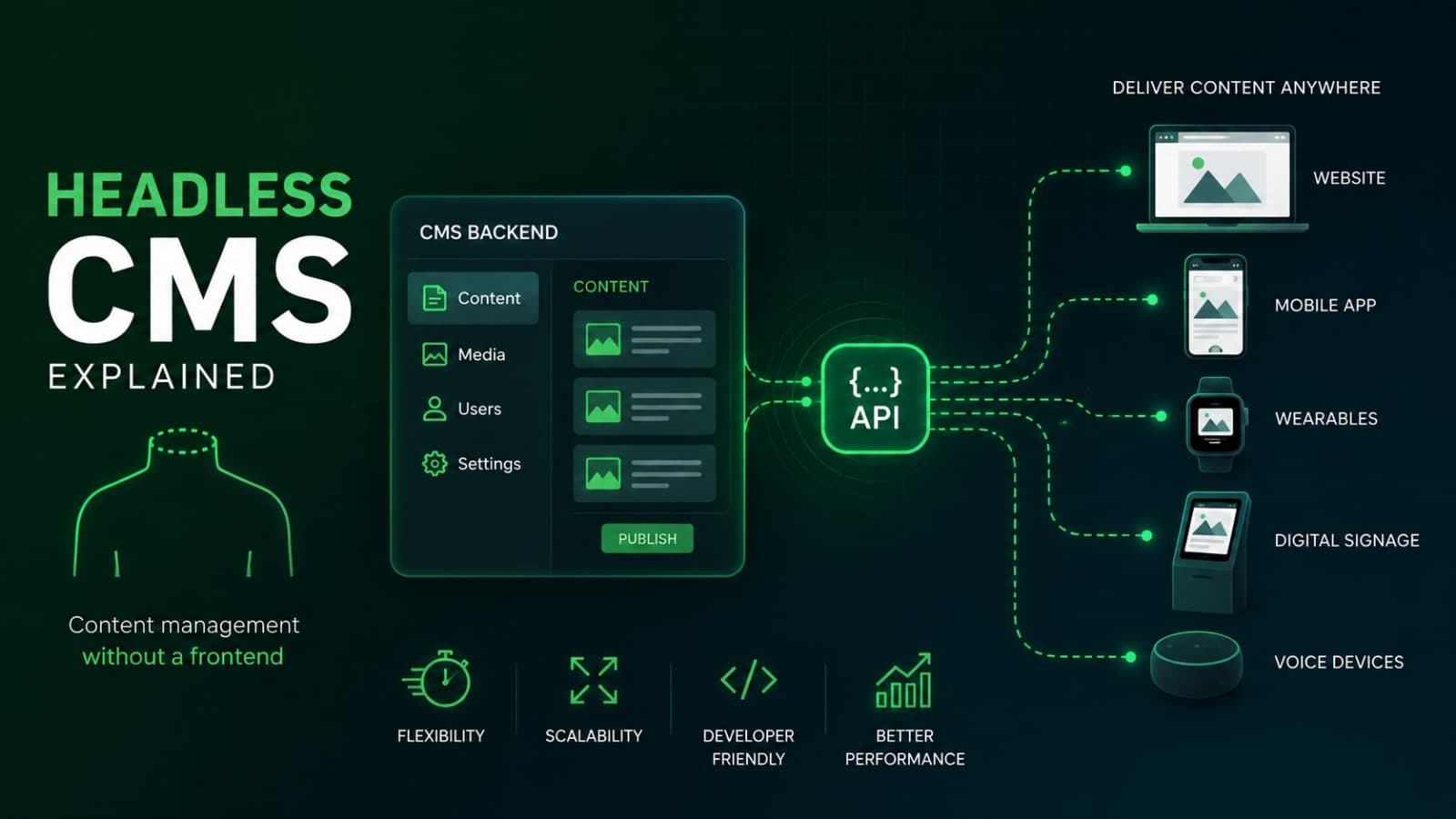
"Headless CMS" is one of those terms that gets thrown around in web development conversations without much explanation, leaving business owners unsure whether it's something they actually need or just industry jargon attached to a trend. In reality, it's a meaningful architectural choice with real tradeoffs — powerful for some businesses, unnecessary complexity for others. This blog breaks down what a headless CMS actually is, and how to know if it's the right fit for your business.
What "Headless" Actually Means
A traditional content management system bundles two things together: the backend where content is created and stored, and the frontend that displays it to visitors. A headless CMS separates these two — content is stored and managed independently, then delivered to whatever frontend needs it through an API, whether that's a website, a mobile app, or another platform entirely.
Think of it as removing the "head" — the built-in display layer — and letting you build a custom frontend that pulls content from the backend however you choose.
What a Traditional CMS Looks Like by Comparison
In a traditional setup, the content management system and the website presentation are tightly connected. Content is created and immediately tied to a specific template and layout within that same system. This works well for many businesses, but it also means the frontend is limited by what the CMS's templating system supports.
The Core Advantage of a Headless CMS
Because content isn't tied to a specific frontend, a headless CMS allows the same content to be delivered across multiple platforms — a website, a mobile app, a kiosk display, or other digital touchpoints — without duplicating content or maintaining separate systems for each one.
This becomes particularly valuable for businesses managing content across more than just a single website.
When a Headless CMS Genuinely Makes Sense
A headless approach tends to be worth the added complexity when:
- You need to deliver the same content across a website and a mobile app development project simultaneously
- Your frontend requires highly custom design or interactivity that a traditional CMS's templating can't support well
- You're building a complex digital product where content is just one part of a larger custom software development effort
- Your business publishes content across multiple channels or platforms regularly
When a Traditional CMS Is Still the Better Choice
A headless CMS isn't automatically the better option for every business. A traditional CMS often makes more sense when:
- You have a single website with straightforward content needs
- Your team wants to manage content without relying heavily on developers for every change
- Budget and timeline favor a faster, simpler setup over long-term architectural flexibility
- You don't currently have plans to deliver content across multiple platforms
The Real Tradeoff: Flexibility vs Simplicity
The core decision comes down to this: a headless CMS offers more flexibility and future-proofing, but requires more upfront web development work to build the custom frontend that displays the content. A traditional CMS is simpler and faster to launch, but more limited if your needs grow beyond what its built-in templates support.
Neither option is universally "better" — the right choice depends on your specific content needs, technical resources, and growth plans.
Who Actually Manages Content With a Headless CMS
A common misconception is that a headless CMS is harder for non-technical teams to use day-to-day. In practice, the content editing experience itself can be just as user-friendly as a traditional CMS — the added complexity lives in the initial setup and frontend development, not in how your team creates and edits content afterward.
Where This Decision Fits Into a Bigger Technical Picture
Choosing between headless and traditional isn't just a content question — it connects to your broader software development strategy, especially if you're planning future integrations, multiple platforms, or highly custom functionality. Making this decision early, with future plans in mind, avoids a costly architectural change later.
Where AI Automation Fits Into a Headless Setup
Businesses using a headless CMS sometimes pair it with AI automation to personalize content delivery across different channels, or to automatically adapt content for different platforms without manual duplication — an approach that's often more natural in a headless architecture than a traditional one.
Frequently Asked Questions
Is a headless CMS more expensive than a traditional CMS?
Generally yes, upfront, since it requires custom frontend development. Whether it's worth the added cost depends on whether your business needs the flexibility it provides.
Do I need a headless CMS if I only have one website?
Not necessarily. If your content needs are limited to a single website with straightforward requirements, a traditional CMS is often simpler and more cost-effective.
Is a headless CMS harder for my team to use for everyday content updates?
Not usually. The added complexity is mostly in the initial technical setup — day-to-day content editing can be just as straightforward as a traditional CMS.
When does a headless CMS make the most sense?
It tends to make sense when content needs to be delivered across multiple platforms, such as a website and a mobile app, or when a highly custom frontend is required.
Can I switch from a traditional CMS to a headless CMS later?
Yes, though it typically involves meaningful rebuilding of the frontend, which is why it's worth considering future plans before making the initial choice.
Not Sure Which CMS Approach Fits Your Business?
Headless versus traditional isn't a trend decision — it's an architectural choice that should follow your actual content and growth needs. At Weboraz, we help you make that call honestly, based on where your business is headed, not what's currently popular. With a hybrid US-India team spanning web development, software development, mobile app development, and AI automation, we build the right foundation for how your content actually needs to work.
Get a free CMS strategy consultation from Weboraz and find out which approach fits your business.
Frequently asked questions
Generally yes, upfront, since it requires custom frontend development. Whether it's worth the added cost depends on whether your business needs the flexibility it provides.
Not necessarily. If your content needs are limited to a single website with straightforward requirements, a traditional CMS is often simpler and more cost-effective.
Not usually. The added complexity is mostly in the initial technical setup — day-to-day content editing can be just as straightforward as a traditional CMS.
It tends to make sense when content needs to be delivered across multiple platforms, such as a website and a mobile app, or when a highly custom frontend is required.
Yes, though it typically involves meaningful rebuilding of the frontend, which is why it's worth considering future plans before making the initial choice.
Related Articles
Need help applying this?
Our team can turn the ideas in this article into a clear plan and a polished build.
Contact Us