

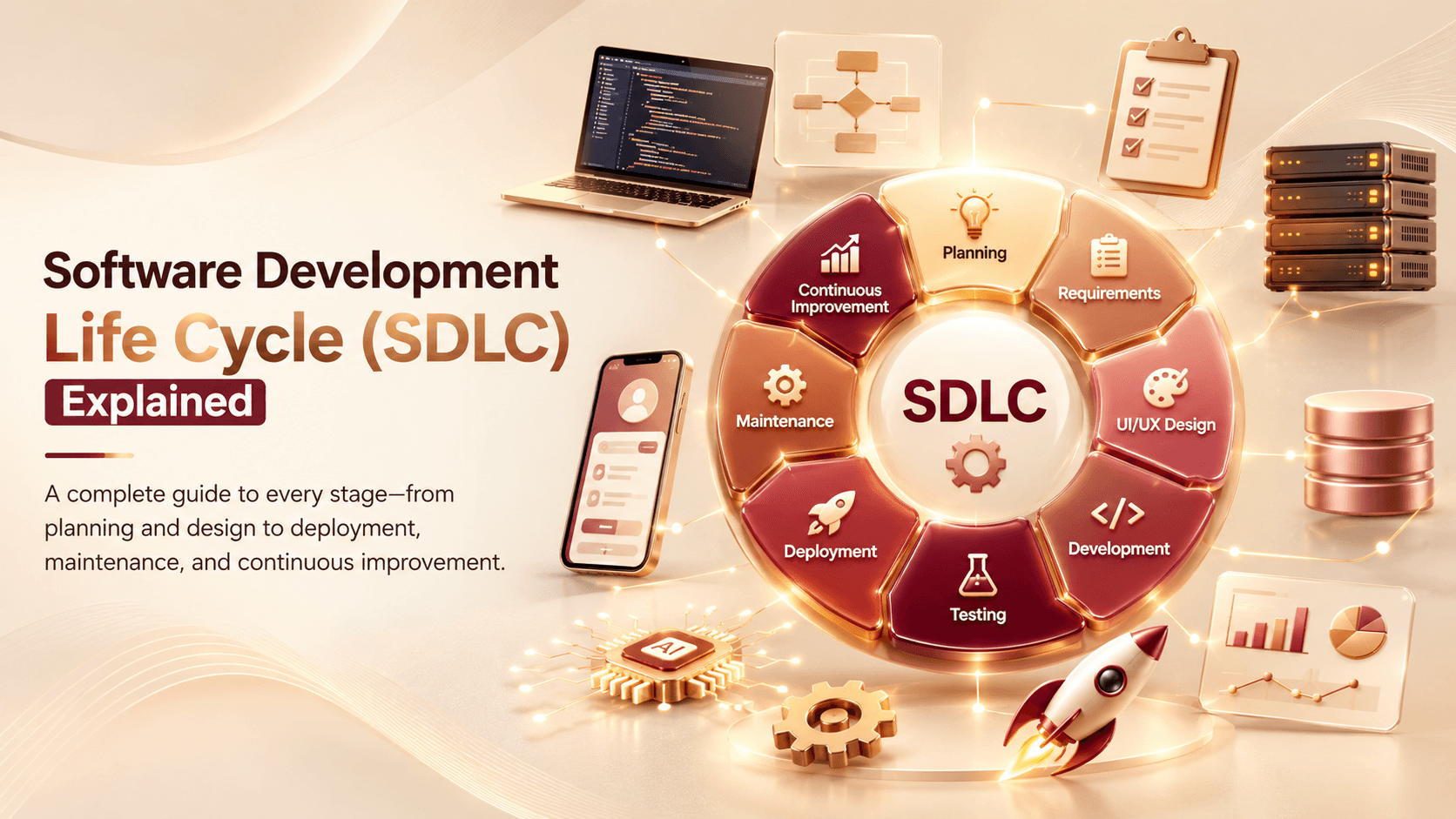
If you've ever commissioned custom software and wondered what actually happens between "we've agreed on the project" and "here's your finished product," the answer is the Software Development Life Cycle, or SDLC — a structured process most development teams follow to build software reliably. Understanding it doesn't require a technical background, but it does help business owners know what to expect at each stage, ask better questions, and set realistic timelines. This blog breaks down the SDLC in plain terms, without the jargon.
What the SDLC Actually Is
The SDLC is simply the structured sequence of stages a software project moves through, from initial idea to a finished, maintained product. Different teams may use slightly different names or groupings for these stages, but the core progression tends to stay consistent across most custom software development projects.
Stage 1: Planning and Requirements Gathering
Before any development begins, this stage focuses on understanding the actual problem the software needs to solve. It typically includes:
- Clarifying business goals and what success looks like
- Identifying who will use the software and how
- Defining the scope of what the first version needs to include
Rushing this stage is one of the most common causes of costly changes later, since unclear requirements tend to surface as expensive rework once development is already underway.
Stage 2: Analysis and Feasibility
Once requirements are gathered, this stage evaluates whether and how the project can realistically be built, including:
- Assessing technical feasibility given the requirements and constraints
- Identifying potential risks or challenges early
- Estimating rough timeline and resource needs based on scope
This stage often shapes important decisions about technology choices before any actual building begins.
Stage 3: Design
Design translates requirements into a concrete plan for how the software will actually work and look, including:
- System architecture - how different parts of the software will connect and function together
- User interface and experience design, mapping out how people will actually interact with it
- Database design, determining how information will be structured and stored
Getting design right at this stage prevents significant rework later, since changes are far easier and cheaper to make on paper than inside working code.
Stage 4: Development
This is the stage most people picture when they think of "building software" - where developers actually write the code that brings the design to life. It typically includes:
- Backend development, building the logic and systems that power functionality
- Frontend development, building the interface users directly interact with
- Regular internal reviews to ensure the build stays aligned with the original requirements
Depending on project size, this stage is often broken into smaller phases or sprints rather than one long continuous build.
Stage 5: Testing
Before anything reaches real users, thorough testing verifies that the software actually works as intended, covering:
- Functional testing to confirm each feature behaves correctly
- Performance testing under realistic usage conditions
- Security testing, especially for software handling sensitive data
- User acceptance testing, where the business confirms the software meets its actual needs
Skipping or rushing this stage is one of the most common causes of costly bugs and issues discovered only after launch.
Stage 6: Deployment
Once testing confirms the software is ready, deployment moves it into the live environment where real users will access it. This stage can involve:
- A full launch, or a phased rollout to a smaller group first
- Final configuration of servers, databases, and infrastructure
- Monitoring closely in the early period after going live to catch any unexpected issues
Stage 7: Maintenance and Iteration
Software doesn't stop needing attention once it's live. Ongoing maintenance includes:
- Fixing bugs that surface under real-world usage
- Applying security updates and patches
- Making improvements and adding features based on actual user feedback
This stage often continues for the life of the software, since businesses and user needs keep evolving well beyond initial launch.
Why Understanding the SDLC Helps Business Owners
Knowing this structure helps business owners ask sharper questions of a development partner, set realistic expectations around timeline and cost, and understand why certain stages - like planning or testing - genuinely matter rather than feeling like unnecessary delays before "the real work" begins.
How the SDLC Applies Beyond Traditional Software
This same structured process applies whether you're building a website through web development, a mobile app development project, or software incorporating AI automation - the specific tools and techniques vary, but the underlying life cycle stages remain fundamentally the same.
Frequently Asked Questions
Do all software projects follow the exact same SDLC stages?
The core stages remain fairly consistent, though the specific approach, naming, and how much time each stage takes can vary depending on the development team and project complexity.
Which SDLC stage is most commonly rushed, and why does it matter?
Planning and requirements gathering is often rushed, since it doesn't feel like "real progress" yet - but unclear requirements here tend to cause expensive rework later in development.
Does the SDLC apply to mobile apps as well as websites?
Yes. The same fundamental stages apply across web development, mobile app development, and most custom software projects, even though specific tools and techniques differ.
Why does testing take a significant amount of time in the SDLC?
Thorough testing catches issues before real users encounter them, since bugs or security gaps discovered after launch are typically far more costly and disruptive to fix.
Does the SDLC end once the software is deployed?
No. Maintenance and iteration continue after deployment, since software requires ongoing updates, bug fixes, and improvements throughout its actual use.
Understanding the Process Behind Your Software
Knowing what happens at each stage helps you collaborate more effectively with whoever builds your software, and know what genuinely matters at each step. At Weboraz, we walk clients through this process transparently, so you always know what stage your project is in and why. With a hybrid US-India team spanning software development, web development, mobile app development, and AI automation, we follow a structured process built to deliver reliable results.
Get a free project consultation with Weboraz and see how we'd approach your software from planning to launch.
Frequently asked questions
The core stages remain fairly consistent, though the specific approach, naming, and how much time each stage takes can vary depending on the development team and project complexity.
Planning and requirements gathering is often rushed, since it doesn't feel like "real progress" yet - but unclear requirements here tend to cause expensive rework later in development.
Yes. The same fundamental stages apply across web development, mobile app development, and most custom software projects, even though specific tools and techniques differ.
Thorough testing catches issues before real users encounter them, since bugs or security gaps discovered after launch are typically far more costly and disruptive to fix.
No. Maintenance and iteration continue after deployment, since software requires ongoing updates, bug fixes, and improvements throughout its actual use.
Related Articles
Need help applying this?
Our team can turn the ideas in this article into a clear plan and a polished build.
Contact Us