
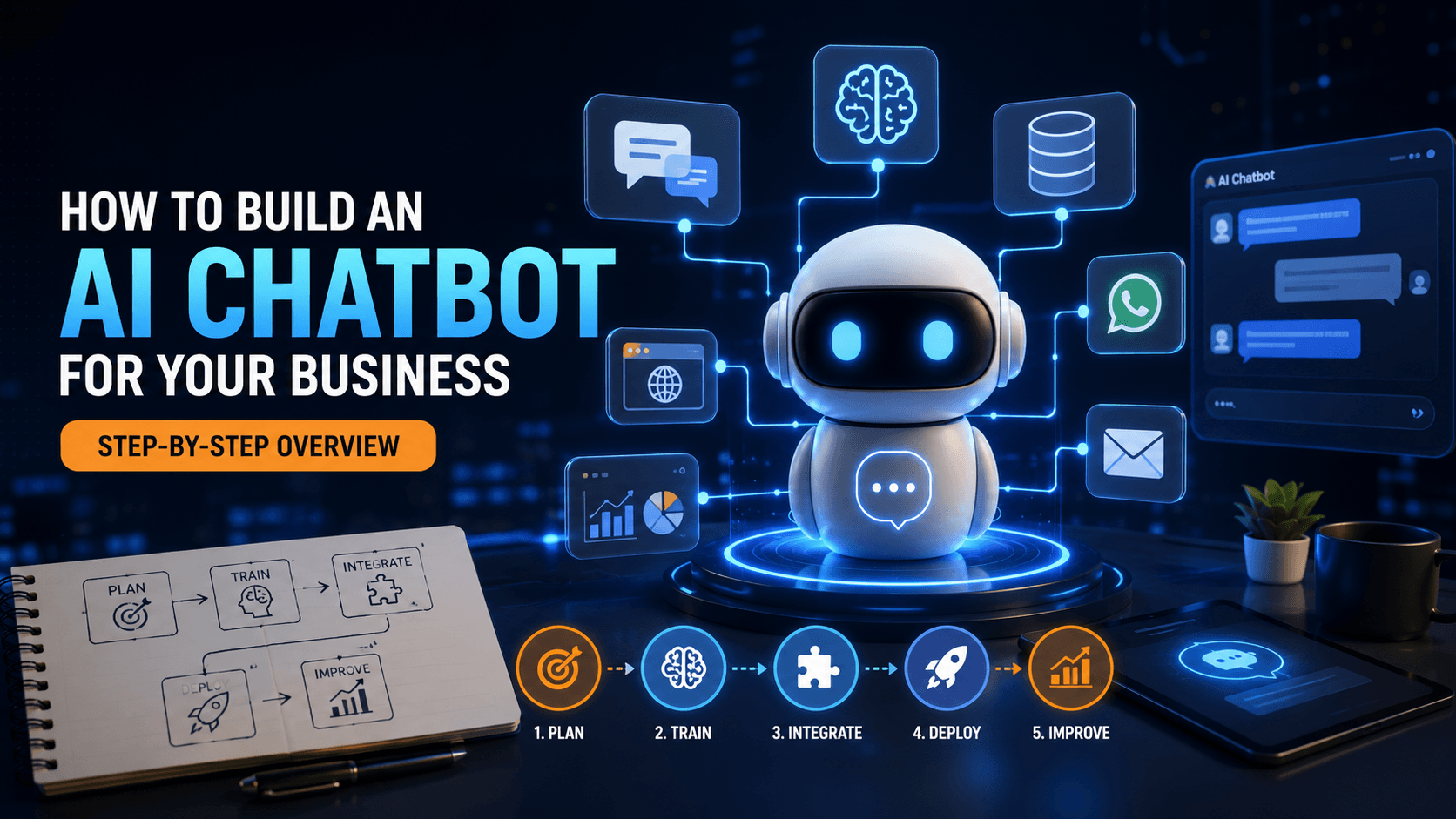
Adding an AI chatbot to your business sounds straightforward until you actually start planning it - and then questions pile up quickly. What should it handle? How does it connect to existing systems? How do you make sure it feels helpful rather than frustrating? This blog walks through the real process of building an AI chatbot for a business, step by step, so you know what's actually involved before getting started.
Step 1: Define the Chatbot's Actual Purpose
Before any technical work begins, it's essential to get specific about what the chatbot is actually meant to do. A chatbot without a clear purpose tends to try doing too much and ends up doing none of it well.
Common purposes include:
- Answering frequently asked customer questions
- Qualifying leads before handing them to a sales team
- Supporting order status, tracking, or account inquiries
- Booking appointments or scheduling
A focused chatbot solving one core problem well tends to outperform a broad, unfocused one trying to handle everything.
Step 2: Identify the Most Common Questions and Scenarios
Once the purpose is clear, the next step is gathering the actual questions and scenarios the chatbot needs to handle. This usually involves reviewing:
- Existing customer support tickets or common inquiries
- Frequently asked questions your team already fields repeatedly
- Scenarios where a human agent typically needs to step in
This step grounds the chatbot in real business needs rather than assumptions about what customers might ask.
Step 3: Decide How the Chatbot Should Handle Complex Cases
An effective chatbot isn't just about answering questions - it's about knowing when it can't, and handing off smoothly to a human agent. Planning this handoff process early, including what context gets passed along, prevents a frustrating experience where customers have to repeat themselves.
Step 4: Choose the Right Technical Approach
At this stage, a key decision gets made about how the chatbot will actually be built. Options generally include:
- Using an existing chatbot platform with some customization
- Building a more tailored solution through custom software development
- A hybrid approach, customizing an existing framework significantly
The right choice depends on how specific and complex your business's needs are — generic platforms work well for simple use cases, while more nuanced requirements usually benefit from a custom build.
Step 5: Integrate With Your Existing Systems
For a chatbot to be genuinely useful, it usually needs access to real business data — order information, account details, or availability, depending on its purpose. This integration work connects the chatbot to your existing systems so it can provide accurate, specific answers rather than generic responses.
Step 6: Design the Conversation Flow
This step focuses on how the chatbot actually communicates:
- Writing clear, natural-sounding responses that match your brand voice
- Planning how the chatbot handles unclear or ambiguous questions
- Designing a tone that feels helpful, not robotic or overly scripted
Getting this right significantly affects whether users find the chatbot genuinely useful or quickly abandon it in frustration.
Step 7: Test Extensively Before Launch
Before going live, thorough testing should cover:
- How the chatbot handles a wide range of phrasing for the same question
- Edge cases and unexpected inputs
- The handoff process to human agents when needed
- Integration accuracy with connected systems
Skipping thorough testing often results in a chatbot that frustrates users during its earliest, most visible period of use.
Step 8: Launch With Monitoring in Place
Once live, close monitoring in the early period helps catch issues quickly:
- Reviewing actual conversations to spot confusion or failure points
- Tracking how often the chatbot successfully resolves inquiries versus escalating
- Gathering user feedback where possible
Step 9: Iterate Based on Real Usage
A chatbot's first version is rarely its final version. Ongoing improvement based on real conversations - refining responses, expanding what it can handle, and fixing gaps - is where much of the long-term value comes from, since real usage reveals patterns that planning alone couldn't fully anticipate.
Where This Fits Into Your Broader AI Automation Strategy
A well-built chatbot is often just one piece of a larger AI automation strategy, and thinking about how it might eventually connect to other automated processes - like lead routing or follow-up sequences - during initial planning can prevent the need for significant rework later.
Frequently Asked Questions
How long does it take to build an AI chatbot for a business?
It varies based on complexity and integration needs, but a focused chatbot handling a specific purpose typically moves faster than one attempting broad, general-purpose functionality.
Do I need a custom-built chatbot, or is an existing platform enough?
It depends on your specific needs. Existing platforms work well for straightforward use cases, while more nuanced or deeply integrated requirements often benefit from a custom build.
What happens when the chatbot can't answer a question?
A well-designed chatbot recognizes when a query is beyond its scope and hands off to a human agent, ideally passing along context so the customer doesn't have to repeat themselves.
Does a chatbot need access to my existing business systems?
Usually yes, if it's meant to provide specific, accurate answers like order status or account details, rather than only generic, static information.
How much testing does a chatbot actually need before launch?
Significant testing, covering varied phrasing, edge cases, and the handoff process, since issues discovered after launch are more visible and disruptive than those caught beforehand.
Ready to Build a Chatbot That Actually Helps?
A chatbot built with a clear purpose and proper integration delivers real value - one built without that foundation often just frustrates the customers it was meant to help. At Weboraz, we walk through this process with you step by step, from defining purpose to post-launch refinement. With a hybrid US-India team spanning AI automation, software development, and web development, we build chatbots designed around how your business actually operates.
Get a free AI chatbot consultation from Weboraz and find out what it would take to build yours.
Frequently asked questions
It varies based on complexity and integration needs, but a focused chatbot handling a specific purpose typically moves faster than one attempting broad, general-purpose functionality.
It depends on your specific needs. Existing platforms work well for straightforward use cases, while more nuanced or deeply integrated requirements often benefit from a custom build.
A well-designed chatbot recognizes when a query is beyond its scope and hands off to a human agent, ideally passing along context so the customer doesn't have to repeat themselves.
Usually yes, if it's meant to provide specific, accurate answers like order status or account details, rather than only generic, static information.
Significant testing, covering varied phrasing, edge cases, and the handoff process, since issues discovered after launch are more visible and disruptive than those caught beforehand.
Related Articles
Need help applying this?
Our team can turn the ideas in this article into a clear plan and a polished build.
Contact Us